Building Minyut: An Embeddable RAG Chatbot in One Script Tag
A client needed their customers to be able to query a 40-page policy document without reading through it. We built the first version of what became Minyut in a weekend. It used a basic embedding approach, answered from an OpenAI endpoint, and — in testing — confidently responded to questions that had no answer in the document at all. It made things up. Fluently. Completely wrong.
That was the founding problem. Every document chatbot we tested made things up. Not because the models were bad, but because they weren't constrained to answer only from the documents. Minyut is one architectural decision made early that forces every answer to come from uploaded content or say "I don't know." Everything else in the product follows from that constraint.
Today, Minyut processes queries for chatbots embedded on Webflow sites, WordPress installs, Shopify stores, React apps, and plain HTML pages. Documents are stored in Supabase's ap-south-1 region (Mumbai). The embed is a single script tag that works on any site in under ten minutes. Here's how it's built.
The Problem That Refused to Go Away — Knowledge Isolation
Standard AI chatbots answer from their training data. For general knowledge, that's exactly what you want. For a support chatbot on a SaaS product, a legal services site, or a consultancy — where accuracy is a liability question, not a preference — it's a serious problem. A chatbot that invents policy details or product specifications isn't a support tool. It's a liability.
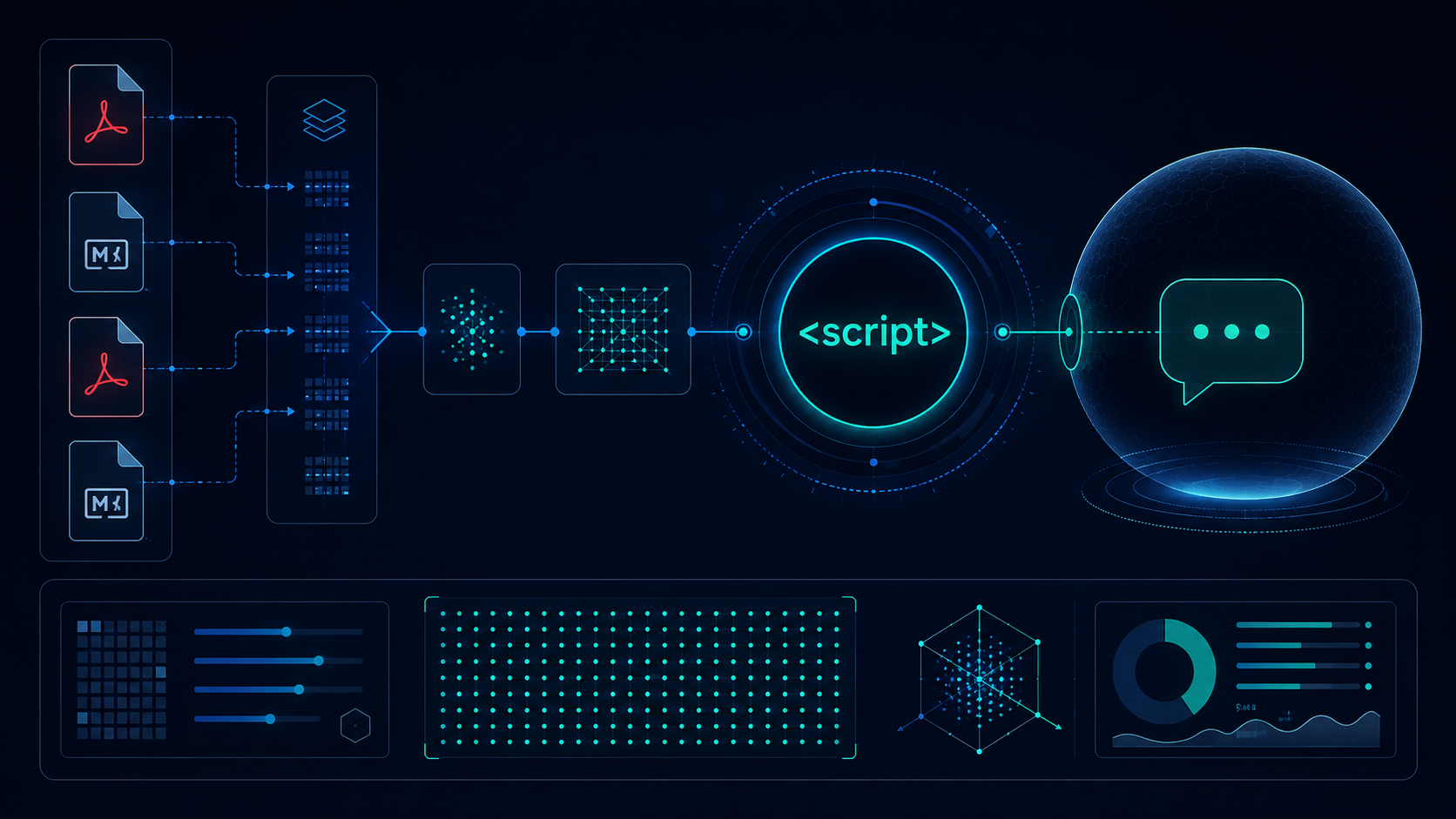
The fix is retrieval-augmented generation: at query time, the user's question gets converted to a vector embedding, we search the document database for the most similar passages, and we send only those passages to the language model as context. The model physically cannot hallucinate something that isn't in the retrieved text. If the answer isn't in the documents, the chatbot says so.
This sounds like an obvious choice in hindsight. It also means the quality of your retrieval pipeline — specifically your chunking and embedding strategy — determines whether the chatbot is useful or frustrating. The language model can only answer as well as the passages you give it. Good retrieval is 80% of what makes Minyut work.
The Chunking and Embedding Pipeline
Documents arrive as PDFs, Markdown, or plain text. Free plan: up to 5MB per file. Paid plans: up to 25MB. Image-heavy PDFs take longer — the indexing pipeline benchmarks at 5–30 seconds per MB depending on content density.
After text extraction, the document gets chunked. Most RAG tutorials treat chunking as an afterthought. Get it wrong and the chatbot either gives fragmented, context-free answers (chunks too small) or buries the relevant part inside retrieved walls of text (chunks too large). We went through three iterations before settling on what works for Minyut's primary use case — business documents like FAQ pages, policy docs, and product manuals.
- First attempt — sentence-level chunks: each sentence became its own chunk. Retrieval was precise on individual facts but lost surrounding context entirely. "What is the refund window?" returned the sentence "Refunds are processed in 7 days" with no information about what conditions triggered a refund. Users rated answers as unhelpful even when technically correct.
- Second attempt — full paragraphs: better context, but variable chunk sizes made similarity scores inconsistent. A 3-line paragraph and a 15-line paragraph both counted as one chunk. The longer ones dominated retrieval regardless of relevance.
- Final approach — fixed-size with overlap: 600 tokens per chunk, 80-token overlap between consecutive chunks. The overlap ensures sentences crossing a chunk boundary appear complete in at least one chunk. For the document types Minyut handles, answer quality jumped measurably in our internal test set.
Each chunk gets embedded using sentence-transformers/all-MiniLM-L6-v2 via the HuggingFace Inference API. The model produces 384-dimensional vectors — fast, accurate for semantic search on business documents, and the HuggingFace free tier handles our current indexing volume without dedicated embedding infrastructure. Indexed chunks and their vectors go into pgvector on Supabase — the same Postgres instance that handles all user data, with the pgvector extension enabled and an HNSW index on the embedding column for fast approximate nearest-neighbour search.
The Widget — One Script Tag, No CSS Conflicts
The single script tag isn't the hard part. The hard part is making a chat widget that renders correctly on every host site without conflicting with the host's CSS. A consultancy's Webflow site, a Shopify store, a custom React app — each of these has its own global stylesheet, z-index stacking context, and positioning rules. A widget that looks right on one will break on three others.
Our first approach was a standard div with scoped CSS class names. On three of the four test hosts we tried, the host theme's CSS overrode our widget's positioning. One WordPress site had a global rule setting all divs to position: relative, which broke the fixed positioning of the chat button. Another had a z-index stacking context that buried the widget under the hero image. Prefixing class names didn't help — the cascade still won.
The solution is Shadow DOM. The widget creates a shadow root — an isolated DOM tree attached to a host element — and builds the entire chat UI inside it. CSS from the host page cannot penetrate a shadow root boundary. Widget CSS doesn't bleed out. Style conflicts become structurally impossible, not just unlikely.
The widget is delivered as an IIFE (Immediately Invoked Function Expression) loaded via an async <script> tag pointing to minyut.com/widget.js. When the script fires, it:
- Creates a new element and appends it to the page body
- Attaches a shadow root to that element
- Injects the widget CSS into the shadow root
- Renders the chat interface inside the shadow root, completely isolated
const host = document.createElement('div');
document.body.appendChild(host);
const shadow = host.attachShadow({ mode: 'open' });
// all widget DOM and styles live inside shadow — no leakage either way
Advanced users can control the widget programmatically via window.__minyut__ — open or close the chat drawer, pre-fill a query, or listen to conversation events from their own JavaScript. This was a late addition, requested by a user embedding Minyut in a React app who wanted the chatbot to open on a specific user action rather than the default button click.
The Infrastructure
Supabase handles the full data layer: Postgres for user and chatbot records, pgvector for embeddings, and Edge Functions (Deno runtime) for the query API. The query endpoint runs as a Supabase Edge Function — serverless, scales to zero between queries, sub-100ms cold start on the Deno runtime. No separate API server to maintain.
We run on ap-south-1 (Mumbai). For the Indian founders, consultancies, and small businesses that make up a significant portion of Minyut's customer base, this matters for latency. It also matters for data residency — customer documents stay in India.
- Netlify: hosts the marketing site, the app dashboard, and serves the widget CDN.
- Razorpay: subscription billing.
- Supabase Storage: documents in private, account-scoped buckets. No cross-account access by design.
- BYOK keys: encrypted AES-256 at rest. You bring your Groq or OpenAI key; we never see it in plaintext after initial submission.
One thing we didn't build: a dedicated ML serving layer. HuggingFace Inference API handles chunk embeddings at indexing time. Groq handles language model completions at query time. Both have generous free tiers and neither requires us to run GPU infrastructure. At Minyut's current scale, this is the right call. The day we need to host inference ourselves, we'll know — it'll show up in the latency metrics first.
The Pricing Decision — No Token Meters
The most common complaint about chatbot SaaS products isn't response quality. It's unexpected billing. Services that charge per token, per message, or per query with no fixed ceiling create anxiety for small teams. You don't know what you'll owe at month end — especially if you get a traffic spike or a user starts stress-testing the widget.
Minyut charges flat fees with fixed query limits. When you hit 80% of your limit, we email you. When you hit 100%, we notify you again. Nothing breaks silently.
- Tinkerers (Free): 1 chatbot, 3 documents, 100 queries/month — enough to test whether Minyut solves your problem before paying anything.
- Starter ($5/month): 3 chatbots, 10 documents, 500 queries/month.
- Pro ($12/month): 10 chatbots, unlimited documents, 2,000 queries/month — includes custom domain, WhatsApp support, and analytics.
- BYOK ($3/month): unlimited queries via your own Groq or OpenAI key. We charge $3 for the infrastructure — storage, bandwidth, dashboard. You pay your provider directly at their rates. For most users on Groq's free tier: $3/month total.
The BYOK plan exists because some teams have high query volumes that would make flat-rate plans unworkable for us, and because some teams specifically want to control which LLM provider processes their data. Groq is the default recommendation for BYOK because the latency is significantly better than OpenAI for conversational responses — sub-second first tokens on the Llama models we've tested, compared to 1–2 seconds on GPT-4o-mini under comparable load.
Three Things That Would Have Saved Us Time
First: chunking strategy determines answer quality more than the choice of language model. We spent weeks evaluating different LLMs when the real variable was chunk size and overlap. Get the chunking right on your specific document types first, then optimize the model. We wasted a month doing it the other way around.
Second: Shadow DOM is the only reliable approach to style isolation for third-party widgets. Scoped CSS, BEM naming, high-specificity selectors — all of these fail on at least some host sites. Shadow DOM is a one-time implementation cost that eliminates an entire class of production issues. Our three CSS-bleeding test cases went to zero the day we switched.
Third: if you're building a chatbot SaaS at indie pricing, structure your infrastructure so a BYOK option is possible from day one. The users who want unlimited queries at their own cost are your most engaged users — they're the ones building real things on your platform. Locking them out of a viable plan tier costs you your most valuable customers. You can try Minyut at minyut.com — free tier, no card required. If you're building something similar and want to compare notes on the RAG pipeline, reach out.
Frequently Asked Questions
-
Q: What file types does Minyut support? PDFs, plain text (.txt), and Markdown (.md). Free plan allows up to 5MB per file; paid plans go up to 25MB. Image-heavy PDFs take longer to process — 5–30 seconds per MB depending on content density.
-
Q: Will the chatbot answer questions that aren't in my documents? No. Minyut is built specifically for knowledge isolation — every answer comes from retrieved passages in your uploaded documents. If a query doesn't match any document passage with sufficient confidence, the chatbot says it doesn't have that information. This is the core architectural decision, not a configurable setting.
-
Q: Which sites and platforms does the embed work on? The single script tag has been tested on WordPress, Webflow, Shopify, Framer, React, Next.js, and plain HTML. The Shadow DOM isolation means it works without style conflicts on any platform that allows custom HTML and JavaScript. If your platform restricts third-party scripts, check its integration documentation first.